Get your players in from WhatsApp or a spreadsheet
Paste your list into the Players tab however it comes and the app reads the names, handicaps, tees and emails for you. Missing details don’t stop you, and nothing needs tidying up first.
FreePaste your list, however it comes
Your list probably lives in a WhatsApp thread, a spreadsheet, or last year’s email. Paste it straight in, however it’s laid out - names on their own, names with handicaps beside them, or a full table with several columns. You don’t have to tidy it up, rename anything, or put the columns in a particular order first.
- Open your trip and go to the Players tab.
- Choose Paste, then copy your list in from wherever it lives.
- Select Add players to bring the list in.
- Check the rows, fix anything that looks wrong, and add them to the trip.
If you would rather not paste, the other tabs do the same job: Upload CSV/XLSX takes a spreadsheet file, and Add one by one is there for a single late entry.
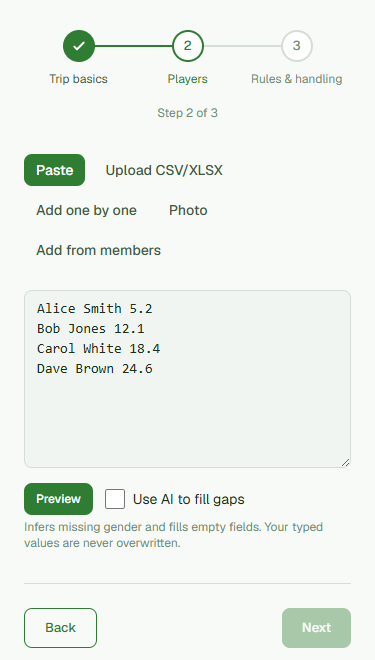
The columns sort themselves out
The app works out which column is which: first name, surname, handicap, gender, tee and email. It manages this whether or not the columns are labelled, and whether they arrive in one order or another, so you are not mapping fields by hand. What it found is shown back to you before anything is saved, and you can correct any row there and then.
Add email addresses now to save yourself a job later
If you paste email addresses in alongside the names, the app keeps them against each player, ready for whenever you want to send out the tee sheet, nightly updates or the final results. You don’t have to add them now, and you can always fill them in afterwards, but getting them in during that first paste saves you chasing everyone down again the week before the trip. Only add addresses for players who are happy to hear from you; the app asks you to confirm that before the first send.
Missing handicaps don’t stop you
Don’t have everyone’s handicap? You can still generate a tee sheet. The scheduler treats a player without a handicap as neutral, so the groups stay fair on the rules you’ve set, and you can drop the missing numbers in later and regenerate in seconds. The only thing every player really needs is a name - handicap, tee, gender and email are all optional.
From a photo of a printed sheet
Only got a printed entry sheet or a photo of the noticeboard? Open the Photo tab and upload the image, and the app reads the names and numbers off it. Anything it was unsure of is highlighted for you to check before it is added. Reading a photo, and the option to have missing details filled in for you on the Paste tab, are both part of the paid plan; typing or pasting a list yourself is free.
Was this helpful?
Last reviewed 7 August 2026
Still stuck?
Tell us what you were trying to do and we will help.
Get in touch